Ads 468x60px

Social Icons

Featured Posts

Latest Post
Tampilkan postingan dengan label IT. Tampilkan semua postingan

Kode Tombol Rahasia Yang Tersembunyi Pada ANDROID

Android merupakan sistem operasi yang berjalan pada smartphone. Android merupakan program open source sehingga lebih mudah dalam menggunakannya. Semakin lama android semakin populer dan banyak digunakan orang di seluruh penjuru dunia karena fitur-fitur yang bagus.Jika Anda pengguna Android.

Berikut ini kode rahasia yang tersembunyi yang dapat digunakan pada telepon seluler Google Android, akses ke hal-hal yang tidak dapat diakses secara default.

Informasi ini ditujukan untuk pengguna yang telah berpengalaman. Tidak dimaksudkan untuk pengguna dasar, hacker, atau mencuri ponsel.

Informasi tentang ponsel dan baterai:
*#*#4636#*#*
Hal ini menunjukkan empat menu berikut yang akan tampil di layar:
-Telepon Informasi
-Informasi baterai
-Sejarah Baterai
-Penggunaan Statistik

Reset data seperti asal:
*#*#7780#*#*
Ini akan menghapus sebagai berikut:
-Pengaturan account Google yang disimpan dalam telepon Agan
-Sistem dan data aplikasi dan pengaturan
-Aplikasi yang Download dan TIDAK akan menghapus.
-Sistem perangkat lunak Lancar dan paket
aplikasi
-SD Card file seperti foto, file musik, dll
Catatan:
Setelah Agan memberikan kode ini, Agan mendapatkan prompt pada layar meminta Agan untuk mengklik pada “Phone Reset” tombol.
Jadi Agan mendapatkan kesempatan untuk
membatalkan operasi.

Format produsen asli:
*2767*3855#
Berpikirlah sebelum Agan memberikan kode ini.
Ini akan menghapus semua file dan pengaturan, termasuk penyimpanan memori internal.
Ini juga akan menginstal ulang firmware telepon.
Catatan:
Setelah Agan memberikan kode ini, tidak ada cara untuk membatalkan operasi, kecuali jika Agan lepaskan baterai dari telepon.
Jadi berpikir dua kali sebelum memberikan kode ini!

Informasi tentang kamera ponsel
*#*#34971539#*#*
Kode ini menunjukkan 4 menu berikut:
-Update firmware kamera dalam gambar(Jangan mencoba opsi ini)
-Update firmware kamera di kartu SD
-Dapatkan versi firmware kamera
-Dapatkan hitungan update firmware
PERINGATAN:
Jangan gunakan opsi pertama dideklarasikan, telepon kamera akan berhenti bekerja dan Agan akan perlu membawa telepon ke layanan service/ toko untuk menginstal ulang firmware kamera

Kode ini dapat digunakan untuk mengubah “End Call/Power”
*#*#7594#*#*
Kode ini dapat digunakan untuk mengubah “End Call/Power” tindakan pada keypad telepon Agan jadi default, jika Agan menekan tombol untuk beberapa saat, ia akan menampilkan layar yang meminta Agan untuk memilih pilihan dari modus Diam, dan Matikan telepon atau Airplane mode. Jangan dapat mengubah aksi menggunakan kode ini.

Buka layar di mana menyalin file:
*#*#273283*255*663282*#*#*

Layanan modus log
*#*#197328640#*#*
Agan dapat menjalankan berbagai tes dan perubahan pengaturan dalam service mode.

Test Kode: WLAN, GPS dan Bluetooth
*#*#232339#*#*

Menampilkan alamat MAC dari WiFi
*#*#1472365#*#*
–GPS uji
*#*#1575#*#*
– tes GPS lain.
*#*#232331#*#*
– Bluetooth uji
*#*#232337#*#

– Menampilkan alamat Bluetooth

GTalk Luncurkan Layanan Monitor
*#*#8255#*#*

Kode untuk mendapatkan informasi versi firmware:

*#*#4986*2650468#*#*
– PDA, Telepon, H / W, RFCallDate:
*#*#1234#*#*
– PDA dan Telepon
*#*#1111#*#*
– FTA Versi SW
*#*2222#*#*
– FTA Versi HW
*#*#44336#*#*
– PDA, Telepon, CSC, Membangun Time, daftar perubahan nomor.

Kode untuk memulai Pengujian berbagai Pabrik:
*#*#0283#*#*

– Loopback paket:
*#*#0*#*#*
– test LCD
*#*#0673#*#* atau *#*#0289#*#*

– tes Melody
*#*#0842#*#*

– Perangkat tes (Getaran, dan tes Backlight)
*#*#2663#*#*

– Touch versi layar
*#*# 2664#*#*

– Touch screen test
*#*#0588#*#*

– Kedekatan uji sensor
*#*# 3264#*#*

ada lagi satu kode yang harus dilakukan jika akan membeli smartphone berOS android, tekan *#36#
itu kode untuk test hp yang dibeli, diantaranya :
- mike dan speaker
- lcd test
- proximity sensor
- camera
- light sensor, dll
itu dijamin berguna banget, kodenya singkat dan gampang dihafal

 ada lagi untuk s*ms*ng , coba ketik *#0*# buat test lcd, recomended buat kalau mau beli hp baru

CAUTION!!!
Disarankan kalau ga ngerti atau masih awam dengan kode kode tersebut!
Di Anjurkan untuk tidak mencobanya!
Karena TS TIDAK BERTANGGUNG JAWAB atas apa yang terjadi dengan android agan!


Semoga Bermanfaat

David Karp, Pemuda yang Situsnya Dibeli Yahoo Rp 10 Triliun

Muda, cerdas, kaya raya. Itulah David Karp (26), pendiri Tumblr. Senin (20/5/2013) lalu, perusahaan miliknya dibeli oleh Yahoo dengan harga fantastis 1,1 miliar dollar AS atau sekitar Rp 10 triliun. Nilai itu sepenuhnya akan dibayarkan dalam bentuk tunai oleh Yahoo.

Tumblr memang menarik. Sejak didirikan pada tahun 2007, Tumblr sudah menjadi rumah bagi 105 juta blog yang dimiliki oleh orang-orang dari segala penjuru dunia.

David Karp lahir pada tanggal 6 Juli 1986 di Manhattan, New York. Di daerah itu pula, dia dibesarkan. Ketika berusia 11 tahun, David sudah mulai belajar tentang HTML dan merancang website. Ketika kecil, sebenarnya dia sempat bercita-cita untuk bisa kuliah di Massachusetts Institute of Technology (MIT). Namun, saat usianya masih 14 tahun, dia sudah mulai merasa bosan dengan sekolah.

Ibu David, Barbara Ackerman, bisa dibilang merupakan orang yang paling berperan dalam membuka jalan bagi kesuksesan anaknya itu. Dalam sebuah artikel di NYTimes.com yang ditulis oleh Jenna Wortham dan Nick Bilton, diceritakan tentang perkenalan David dengan Fred Seibert, seorang produser TV ternama di AS. Saat itu tahun 2000. David berusia 14 tahun dan sudah duduk di bangku SMA. Sementara Seibert masih bekerja sebagai creative director di MTV.

Ibu David yang bekerja sebagai guru sains di Calhoun School, sekolah swasta di kawasan Upper West Side, Manhattan, mengajar anak-anak Seibert dan berteman baik dengan istrinya. Kepada istri Seibert, ibu David bercerita tentang anaknya yang cerdas, yang tengah merasa bosan dengan sekolahnya. Mendengar itu, istri Seibert menyarankan ibu David untuk mempertemukan David dengan suaminya.

Singkat cerita, David pun menyambangi kantor Seibert di kawasan Park Avanue. Kepada Seibert, dia mengatakan ingin belajar soal engineering. Akhirnya, Seibert menerima David untuk magang sebagai asistennya.

Suatu hari, David datang ke kantor Seibert dan mengatakan akan datang ke sana setiap hari karena dia sudah drop out dari SMA. Seibert tahu David gemar mengutak-atik komputer dan mengerti HTML. Akhirnya, dia meminta David membangun website untuk perusahaan barunya, Next New Networks, yang bergerak di bidang video production.

Seibert bercerita, David memberi tahu dia tentang bagaimana orang-orang akan menonton video di masa depan. Saat itu, Apple baru akan merilis iPod video. Berkat wawasan dari David itu, Next New Networks bisa menjadi salah satu produk video pertama di iTunes, hingga akhirnya diakuisisi oleh Google melalui YouTube.

Hingga kini, kerja sama antara Seibert dengan David masih terjalin. Seibert bahkan tercatat sebagai investor di Tumblr dan duduk di jajaran direksi perusahaan tersebut.

"Drop out" SMA

David adalah anak yang cerdas. Dia pendiam dan cenderung tertutup. Hal itu pun diakuinya sendiri. Dia lebih suka datang lebih pagi ke kantor untuk bekerja dengan tenang.

"Saat di mana saya merasa paling produktif adalah ketika saya tenggelam dalam kode, tenggelam dalam beberapa proyek, dan mengutak-atik desain," kata David dalam sebuah acara Founders Conference yang berlangsung di New York.

Ketika remaja, kebanyakan waktunya dia habiskan untuk bermain dengan komputernya di kamar. Melihat David "lengket" dengan komputer, alih-alih menyuruh anaknya bermain di luar rumah dan menghirup udara segar, sang ibu malah menyarankan anaknya itu untuk drop out dan mengikuti "homeschooling".

"Aku melihat dia di sekolah seharian dan menghabiskan waktunya semalaman di depan komputer," kata ibu David seperti dikutip dari NYTimes. "Sangat jelas bahwa David membutuhkan ruang untuk menghidupkan passion-nya, yakni komputer," lanjut ibunya.

Pada usia 15 tahun, akhirnya David drop out dari Bronx High School of Science. Selama 3 tahun berikutnya, dia menjalani homeschooling.

Sukses di usia muda

Ketika usianya beranjak 18 tahun, David memutuskan untuk langsung menapaki dunia kerja. Dia sempat pergi ke Tokyo, Jepang, untuk bekerja di sebuah startup (perusahaan rintisan) bernama UrbanBaby, yang menyediakan layanan online parenting bagi para orangtua. Ketika para remaja sepantarannya belajar di bangku kuliah, David sudah menjabat sebagai Head of Product di UrbanBaby.

Pada tahun 2006, CNET Networks mengakuisisi UrbanBaby. David kembali ke AS. Jabatan terakhirnya ketika itu adalah chief technology officer (CTO) di UrbanBaby. Setelah akuisisi itu, pada tahun yang sama, David mengundurkan diri dan membangun sebuah perusahaan konsultan miliknya sendiri. Perusahaan itu bernama Davidville. Salah satu proyek yang dia kerjakan di Davidville adalah layanan blog sederhana yang berkembang menjadi Tumblr.

Sebelum Yahoo mengumumkan membeli Tumblr, layanan blogging tersebut sudah bernilai lebih dari 200 juta dollar AS. Namun, hal itu tidak membuat David hidup dalam kemewahan. Sehari-hari, David lebih suka mengendarai Vespa dari tempat tinggalnya di kawasan Brooklyn menuju markas Tumblr di New York. David yang bertubuh tinggi ramping juga lebih suka tampil kasual dalam balutan jeans, T-shirt, dan sneakers.

Sosok David yang baru berusia 26 tahun kian disorot ketika berita tentang Yahoo yang tertarik membeli Tumblr mulai mengemuka. Kini, setelah Yahoo membeli Tumblr, David pun resmi masuk ke dalam kelompok kecil entrepreneur muda kaya raya yang usianya di bawah 30 tahun, menemani pendiri Facebook, Mark Zuckerberg.

Wow! Remaja 18 Tahun Ciptakan Charger Ponsel 30 Detik

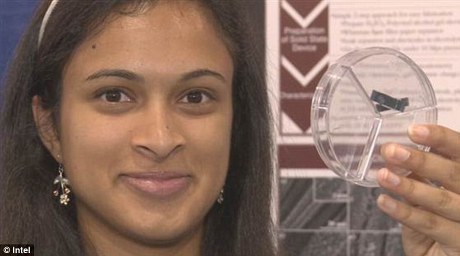
California, AS - Sebuah perangkat mini yang bisa mengisi ulang baterai ponsel hanya dalam waktu sekitar 30 detik memenangkan penghargaan bergengsi. Hebatnya, penciptanya adalah remaja yang baru berusia 18 tahun.

Eesha Khare, pelajar di Lynbrook High School, California, memenangi penghargaan Young Scientist Award di ajang Intel International Science and Engineering Fair.

Perangkat buatan Eesha berbentuk kecil, berwarna hitam dengan ukuran 1 inch. Perangkat ini bisa dimasukkan ke dalam baterai ponsel untuk mempecepat proses charger.

"Aku mengembangkan super kapasitor baru, yang pada dasarnya adalah perangkat penyimpan energi yang menyimpan banyak energi," jelas Eesha.

Berkat penemuan tersebut, Keesha memperoleh hadiah uang USD 50 ribu. Dia berencana menggunakannya sebagai biaya kuliah di kampus bergengsi, Harvard University.

Gadget tersebut saat ini memang baru diujicoba untuk mendayai lampu LED. Namun kemungkinan besar bisa sukses juga sebagai sumber daya di perangkat seperti ponsel atau tablet PC, meski masih butuh waktu untuk mengembangkannya lebih lanjut.

Kabarnya, Google juga tertarik mengembangkan teknologi tersebut. Demikian seperti dikutip detikINET dari CNN, Selasa (21/5/2013).

Program design And Components

Program design
    Program design of small programs is relatively simple and involves the analysis of the problem, collection of inputs, using the programming constructs within languages, devising or using established procedures and algorithms, providing data for output devices and solutions to the problem as applicable. As problems become larger and more complex, features such as subprograms, modules, formal documentation, and new paradigms such as object-oriented programming are encountered. Large programs involving thousands of line of code and more require formal software methodologies. The task of developing large software systems presents a significant intellectual challenge. Producing software with an acceptably high reliability within a predictable schedule and budget has historically been difficult; the academic and professional discipline of software engineering concentrates specifically on this challenge.


Components

A general purpose computer has four main components: the arithmetic logic unit (ALU), the control unit, the memory, and the input and output devices (collectively termed I/O). These parts are interconnected by busses, often made of groups of wires.
Inside each of these parts are thousands to trillions of small electrical circuits which can be turned off or on by means of an electronic switch. Each circuit represents a bit (binary digit) of information so that when the circuit is on it represents a "1", and when off it represents a "0" (in positive logic representation). The circuits are arranged in logic gates so that one or more of the circuits may control the state of one or more of the other circuits.
The control unit, ALU, registers, and basic I/O (and often other hardware closely linked with these) are collectively known as a central processing unit (CPU). Early CPUs were composed of many separate components but since the mid-1970s CPUs have typically been constructed on a single integrated circuit called a microprocessor.

Programming language

Programming languages provide various ways of specifying programs for computers to run. Unlike natural languages, programming languages are designed to permit no ambiguity and to be concise. They are purely written languages and are often difficult to read aloud. They are generally either translated into machine code by a compiler or an assembler before being run, or translated directly at run time by an interpreter. Sometimes programs are executed by a hybrid method of the two techniques.

Machine code

In most computers, individual instructions are stored as machine code with each instruction being given a unique number (its operation code or opcode for short). The command to add two numbers together would have one opcode, the command to multiply them would have a different opcode and so on. The simplest computers are able to perform any of a handful of different instructions; the more complex computers have several hundred to choose from, each with a unique numerical code. Since the computer's memory is able to store numbers, it can also store the instruction codes. This leads to the important fact that entire programs (which are just lists of these instructions) can be represented as lists of numbers and can themselves be manipulated inside the computer in the same way as numeric data. The fundamental concept of storing programs in the computer's memory alongside the data they operate on is the crux of the von Neumann, or stored program, architecture. In some cases, a computer might store some or all of its program in memory that is kept separate from the data it operates on. This is called the Harvard architecture after the Harvard Mark I computer. Modern von Neumann computers display some traits of the Harvard architecture in their designs, such as in CPU caches.
While it is possible to write computer programs as long lists of numbers (machine language) and while this technique was used with many early computers,[35] it is extremely tedious and potentially error-prone to do so in practice, especially for complicated programs. Instead, each basic instruction can be given a short name that is indicative of its function and easy to remember – a mnemonic such as ADD, SUB, MULT or JUMP. These mnemonics are collectively known as a computer's assembly language. Converting programs written in assembly language into something the computer can actually understand (machine language) is usually done by a computer program called an assembler.

Bugs

Errors in computer programs are called "bugs". They may be benign and not affect the usefulness of the program, or have only subtle effects. But in some cases they may cause the program or the entire system to "hang" – become unresponsive to input such as mouse clicks or keystrokes – to completely fail, or to crash. Otherwise benign bugs may sometimes be harnessed for malicious intent by an unscrupulous user writing an exploit, code designed to take advantage of a bug and disrupt a computer's proper execution. Bugs are usually not the fault of the computer. Since computers merely execute the instructions they are given, bugs are nearly always the result of programmer error or an oversight made in the program's design.[33]
Rear Admiral Grace Hopper is credited for having first used the term "bugs" in computing after a dead moth was found shorting a relay in the Harvard Mark II computer in September 1947

Stored program architecture

In most cases, computer instructions are simple: add one number to another, move some data from one location to another, send a message to some external device, etc. These instructions are read from the computer's memory and are generally carried out (executed) in the order they were given. However, there are usually specialized instructions to tell the computer to jump ahead or backwards to some other place in the program and to carry on executing from there. These are called "jump" instructions (or branches). Furthermore, jump instructions may be made to happen conditionally so that different sequences of instructions may be used depending on the result of some previous calculation or some external event. Many computers directly support subroutines by providing a type of jump that "remembers" the location it jumped from and another instruction to return to the instruction following that jump instruction.
Program execution might be likened to reading a book. While a person will normally read each word and line in sequence, they may at times jump back to an earlier place in the text or skip sections that are not of interest. Similarly, a computer may sometimes go back and repeat the instructions in some section of the program over and over again until some internal condition is met. This is called the flow of control within the program and it is what allows the computer to perform tasks repeatedly without human intervention.
Comparatively, a person using a pocket calculator can perform a basic arithmetic operation such as adding two numbers with just a few button presses. But to add together all of the numbers from 1 to 1,000 would take thousands of button presses and a lot of time, with a near certainty of making a mistake. On the other hand, a computer may be programmed to do this with just a few simple instructions. For example:


  mov #0, sum     ; set sum to 0
      mov #1, num     ; set num to 1
loop: add num, sum    ; add num to sum
      add #1, num     ; add 1 to num
      cmp num, #1000  ; compare num to 1000
      ble loop        ; if num <= 1000, go back to 'loop
 halt            ; end of program. stop running


Once told to run this program, the computer will perform the repetitive addition task without further human intervention. It will almost never make a mistake and a modern PC can complete the task in about a millionth of a second.

Programs

The defining feature of modern computers which distinguishes them from all other machines is that they can be programmed. That is to say that some type of instructions (the program) can be given to the computer, and it will carry process them. While some computers may have strange concepts "instructions" and "output" (see quantum computing), modern computers based on the von Neumann architecture often have machine code in the form of an imperative programming language.
In practical terms, a computer program may be just a few instructions or extend to many millions of instructions, as do the programs for word processors and web browsers for example. A typical modern computer can execute billions of instructions per second (gigaflops) and rarely makes a mistake over many years of operation. Large computer programs consisting of several million instructions may take teams of programmers years to write, and due to the complexity of the task almost certainly contain errors.

Semiconductors and microprocessors

Computers using vacuum tubes as their electronic elements were in use throughout the 1950s, but by the 1960s had been largely replaced by semiconductor transistor-based machines, which were smaller, faster, cheaper to produce, required less power, and were more reliable. The first transistorised computer was demonstrated at the University of Manchester in 1953.[31] In the 1970s, integrated circuit technology and the subsequent creation of microprocessors, such as the Intel 4004, further decreased size and cost and further increased speed and reliability of computers. By the late 1970s, many products such as video recorders contained dedicated computers called microcontrollers, and they started to appear as a replacement to mechanical controls in domestic appliances such as washing machines. The 1980s witnessed home computers and the now ubiquitous personal computer. With the evolution of the Internet, personal computers are becoming as common as the television and the telephone in the household[citation needed].
Modern smartphones are fully programmable computers in their own right, and as of 2009 may well be the most common form of such computers in existence

Stored-program architecture

Several developers of ENIAC, recognizing its flaws, came up with a far more flexible and elegant design, which came to be known as the "stored-program architecture" or von Neumann architecture. This design was first formally described by John von Neumann in the paper First Draft of a Report on the EDVAC, distributed in 1945. A number of projects to develop computers based on the stored-program architecture commenced around this time, the first of which was completed in 1948 at the University of Manchester in England, the Manchester Small-Scale Experimental Machine (SSEM or "Baby"). The Electronic Delay Storage Automatic Calculator (EDSAC), completed a year after the SSEM at Cambridge University, was the first practical, non-experimental implementation of the stored-program design and was put to use immediately for research work at the university. Shortly thereafter, the machine originally described by von Neumann's paper—EDVAC—was completed but did not see full-time use for an additional two years.
Nearly all modern computers implement some form of the stored-program architecture, making it the single trait by which the word "computer" is now defined. While the technologies used in computers have changed dramatically since the first electronic, general-purpose computers of the 1940s, most still use the von Neumann architecture.
Beginning in the 1950s, Soviet scientists Sergei Sobolev and Nikolay Brusentsov conducted research on ternary computers, devices that operated on a base three numbering system of −1, 0, and 1 rather than the conventional binary numbering system upon which most computers are based. They designed the Setun, a functional ternary computer, at Moscow State University. The device was put into limited production in the Soviet Union, but supplanted by the more common binary architecture.

First general-purpose computers

In 1801, Joseph Marie Jacquard made an improvement to the textile loom by introducing a series of punched paper cards as a template which allowed his loom to weave intricate patterns automatically. The resulting Jacquard loom was an important step in the development of computers because the use of punched cards to define woven patterns can be viewed as an early, albeit limited, form of programmability.

      
It was the fusion of automatic calculation with programmability that produced the first recognizable computers. In 1837, Charles Babbage was the first to conceptualize and design a fully programmable mechanical computer, his analytical engine.[20] Limited finances and Babbage's inability to resist tinkering with the design meant that the device was never completed ; nevertheless his son, Henry Babbage, completed a simplified version of the analytical engine's computing unit (the mill) in 1888. He gave a successful demonstration of its use in computing tables in 1906. This machine was given to the Science museum in South Kensington in 1910.
In the late 1880s, Herman Hollerith invented the recording of data on a machine-readable medium. Earlier uses of machine-readable media had been for control, not data. "After some initial trials with paper tape, he settled on punched cards ..."[21] To process these punched cards he invented the tabulator, and the keypunch machines. These three inventions were the foundation of the modern information processing industry. Large-scale automated data processing of punched cards was performed for the 1890 United States Census by Hollerith's company, which later became the core of IBM. By the end of the 19th century a number of ideas and technologies, that would later prove useful in the realization of practical computers, had begun to appear: Boolean algebra, the vacuum tube (thermionic valve), punched cards and tape, and the teleprinter.
During the first half of the 20th century, many scientific computing needs were met by increasingly sophisticated analog computers, which used a direct mechanical or electrical model of the problem as a basis for computation. However, these were not programmable and generally lacked the versatility and accuracy of modern digital computers.
Alan Turing is widely regarded as the father of modern computer science. In 1936 Turing provided an influential formalisation of the concept of the algorithm and computation with the Turing machine, providing a blueprint for the electronic digital computer.[22] Of his role in the creation of the modern computer, Time magazine in naming Turing one of the 100 most influential people of the 20th century, states: "The fact remains that everyone who taps at a keyboard, opening a spreadsheet or a word-processing program, is working on an incarnation of a Turing machine".[22]

Limited-function early computers

The history of the modern computer begins with two separate technologies, automated calculation and programmability, but no single device can be identified as the earliest computer, partly because of the inconsistent application of that term. A few devices are worth mentioning though, like some mechanical aids to computing, which were very successful and survived for centuries until the advent of the electronic calculator, like the Sumerian abacus, designed around 2500 BC[4] of which a descendant won a speed competition against a modern desk calculating machine in Japan in 1946,[5] the slide rules, invented in the 1620s, which were carried on five Apollo space missions, including to the moon[6] and arguably the astrolabe and the Antikythera mechanism, an ancient astronomical computer built by the Greeks around 80 BC.[7] The Greek mathematician Hero of Alexandria (c. 10–70 AD) built a mechanical theater which performed a play lasting 10 minutes and was operated by a complex system of ropes and drums that might be considered to be a means of deciding which parts of the mechanism performed which actions and when.[8] This is the essence of programmability.
Around the end of the 10th century, the French monk Gerbert d'Aurillac brought back from Spain the drawings of a machine invented by the Moors that answered either Yes or No to the questions it was asked.[9] Again in the 13th century, the monks Albertus Magnus and Roger Bacon built talking androids without any further development (Albertus Magnus complained that he had wasted forty years of his life when Thomas Aquinas, terrified by his machine, destroyed it).[10]
In 1642, the Renaissance saw the invention of the mechanical calculator,[11] a device that could perform all four arithmetic operations without relying on human intelligence.[12] The mechanical calculator was at the root of the development of computers in two separate ways. Initially, it was in trying to develop more powerful and more flexible calculators[13] that the computer was first theorized by Charles Babbage[14][15] and then developed.[16] Secondly, development of a low-cost electronic calculator, successor to the mechanical calculator, resulted in the development by Intel[17] of the first commercially available microprocessor integrated circuit
 
Support : Creating Website | Johny Template | Mas Template
Copyright © 2011. Fadly Bachtiar - All Rights Reserved
Template Created by Creating Website Published by Mas Template
Proudly powered by Blogger